
Screenshots
About TV (Apple) Remote Control
Control your Apple TV from your Android phone or tablet with this powerful remote control app. TV (Apple) Remote Control delivers two flexible control methods—network remote over Wi-Fi or infrared remote for compatible devices—giving you seamless access to your entertainment whenever you need it.
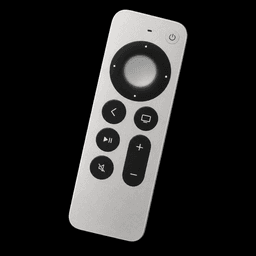
Whether your physical Apple TV remote is lost, damaged, or simply out of reach, this app restores full command over your TV experience. The intuitive interface mirrors the traditional Apple TV remote layout, so navigation feels natural from day one. Swipe through menus using touch-style directional buttons, tap to select, and access essential controls like play, pause, volume, and mute with a single touch.
Beyond basic playback control, the app empowers you to launch apps instantly from a curated list of popular streaming services. Need to search for a movie or enter your login credentials? The built-in keyboard input feature makes text entry effortless—no more pecking at your TV screen. You can also cast local files or media URLs directly from your Android device to Apple TV, transforming your phone into a powerful content hub.
Customization puts control in your hands. Switch between light, dark, and system theme options to match your preference, and rearrange buttons to suit your viewing habits. The full remote layout includes extra controls and customizable shortcuts, so frequently used features are always within reach. Device discovery happens automatically when your Android phone and Apple TV share the same local Wi-Fi network, but you can also manually add devices by IP address if needed.
Two connection modes ensure compatibility with your setup. Network remote mode works with supported Apple TV models over your home Wi-Fi, while infrared mode activates on Android devices with a built-in IR transmitter for direct line-of-sight control. Available features scale with your Apple TV model, tvOS version, and enabled services, so you get the most from your specific hardware.
Simple pairing and device discovery mean you're up and running in seconds. Whether you're adjusting volume from the couch, launching Netflix from the kitchen, or streaming a playlist to your living room, TV (Apple) Remote Control keeps your entertainment at your fingertips.
Pros & Cons
Pros
- Works as Wi-Fi remote or infrared for broader device compatibility
- Built-in keyboard input eliminates tedious on-screen text entry
- Cast files and media URLs directly from your Android device
- Customizable button layout and theme options for personal preference
Cons
- Requires Android device and Apple TV on the same local Wi-Fi network
- IR mode only works on Android phones with built-in infrared transmitter
- Feature availability depends on your specific Apple TV model and tvOS version
- Cannot replace physical remote for devices without network or IR capability
Frequently asked questions about TV (Apple) Remote Control
Is TV (Apple) Remote Control safe to download?
The TV (Apple) Remote Control file on Unstore was scanned for malware on May 20, 2026. The scan found no threats and gave it a risk score of 5/100 (lower is safer).
What are the system requirements for TV (Apple) Remote Control?
TV (Apple) Remote Control runs on Android. It requires Android 7.0 (Nougat) or later. The download size is 33.7 MB.
What is the latest version of TV (Apple) Remote Control?
The latest version of TV (Apple) Remote Control on Unstore is 2.0.0. It was last updated on May 25, 2026.
Who develops TV (Apple) Remote Control?
TV (Apple) Remote Control is developed by Dev Null.
Related Apps

Microsoft PowerToys
Windows utilities and productivity tools — enhance your workflow with system tools, window management, and file preview features.

Windows Essentials 2012
Email, messaging, photo editing, video creation, and cloud storage—Windows Essentials 2012 includes all the productivity tools you need.

Free Download Manager
Download manager that speeds up transfers, organizes files by type, and syncs with Firefox and Chrome.

HWiNFO
Hardware monitoring for Windows—track CPU temp, GPU load, fan speed, voltage in real time.

TransMac
Read Mac drives and DMG files on Windows. Access APFS/HFS+ storage and create disk images.

TestDisk & PhotoRec
Recover lost files and repair disk partitions — free open-source data recovery tool for Windows.
Latest Articles

Play a free Poly Bridge-style bridge builder in your browser (no download)
Nov 14, 2026

Play a free Balatro-style poker roguelike in your browser (no download)
Nov 14, 2026

GarageBand for Android or Chromebook? A free music studio in your browser
Nov 14, 2026

FlipaClip for PC or Chromebook? We built a free animation maker that runs in your browser
Nov 14, 2026

Play a free Color Ball Sort Puzzle-style game in your browser (no download)
Oct 6, 2026